ShopDreamUp AI ArtDreamUp

Deviation Actions



Description
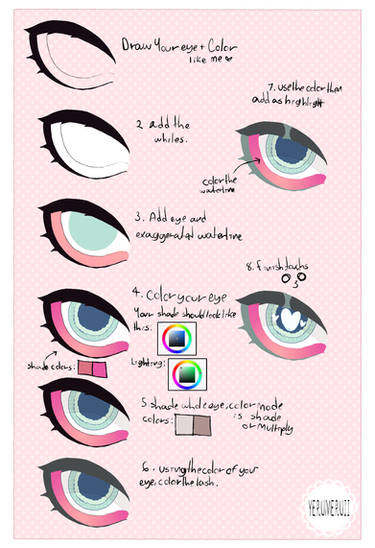
I use Photoshop7. You can do this layer trick in about any program. You don't need to have 7 or photoshop for that matter. I've done this in Open canvas too and I'm pretty sure painter would also let you but I don't like using painter.
And Another helpful tip is the hot keys. You can hit [ and ] on your keyboard and it will make your brush size change for you. This is very helpful. Control z is to undo but only once. I usually just use the history to go back on a mistake.
I guess I should mention too that you can use the fill bucket to fill in the color for better accuracy so that you wont miss a spot but I use my brush at such a giant size that it not a problem for me.
anndddddd because you are using ONE color on your shadow layer its not always going to work perfectly. So like say you have a dark blue as your shadow and the girls hair is dark too the shadow isnt going to show up as well like it would on the skin which is light. So what you want to do is go to the line art and select the part like say all her skin? and select it then go back to the layer with the shadows and go up to "image" and play with the brightness and contrast until you get it as light or as dark as you want!
note that you shouldnt always use this shading method. I really like playing with the color balance in the end anyway! These are just helpful tips hopefully making it easier for you to use photoshop and layers.
If you have any questions please feel free to note me but please read over everything first :3
And Another helpful tip is the hot keys. You can hit [ and ] on your keyboard and it will make your brush size change for you. This is very helpful. Control z is to undo but only once. I usually just use the history to go back on a mistake.
I guess I should mention too that you can use the fill bucket to fill in the color for better accuracy so that you wont miss a spot but I use my brush at such a giant size that it not a problem for me.
anndddddd because you are using ONE color on your shadow layer its not always going to work perfectly. So like say you have a dark blue as your shadow and the girls hair is dark too the shadow isnt going to show up as well like it would on the skin which is light. So what you want to do is go to the line art and select the part like say all her skin? and select it then go back to the layer with the shadows and go up to "image" and play with the brightness and contrast until you get it as light or as dark as you want!
note that you shouldnt always use this shading method. I really like playing with the color balance in the end anyway! These are just helpful tips hopefully making it easier for you to use photoshop and layers.
If you have any questions please feel free to note me but please read over everything first :3
Image size
880x3193px 812.5 KB
© 2006 - 2024 zambicandy
Comments599

This tutorial looks quite helpful! Your coloring/shading style looks great 
Comments have been disabled for this deviation